
Building an online learning platform no longer requires a custom-developed website or an expensive hosted solution. With the right WordPress Learning Management System (LMS) plugin, you can create courses, manage students, deliver lessons, conduct quizzes, and sell educational content directly from your website.
One plugin that has earned considerable attention in this space is Tutor LMS, developed by Themeum. It offers a flexible set of tools for building everything from a simple online course website to a multi-instructor learning marketplace.
But is Tutor LMS really worth using in 2026? Does its free version offer enough functionality to get started? And how does its Pro version compare with other WordPress LMS solutions?
In this Tutor LMS review, we’ll explore its features, course creation experience, student management tools, monetization options, integrations, pricing, and potential limitations. We’ll also look at who can benefit most from this plugin and whether it’s the right choice for your online education business.
Let’s take a closer look.
1. What Is Tutor LMS?
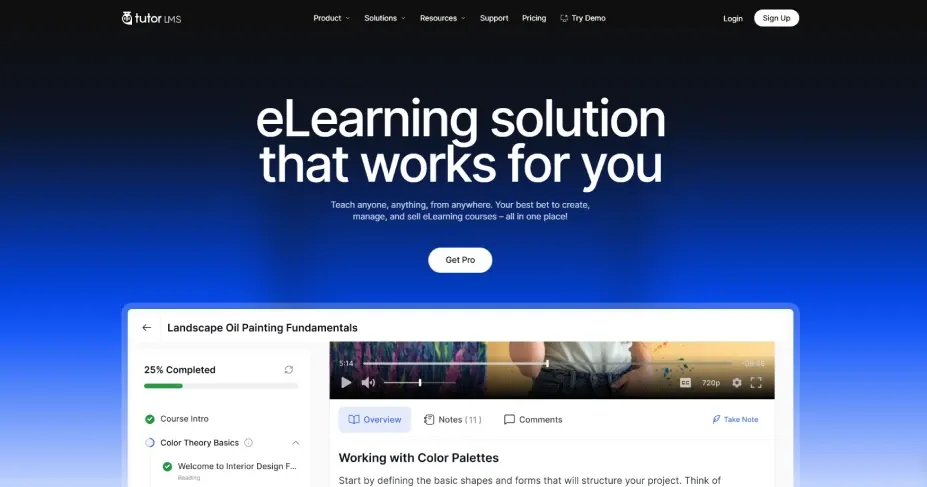
Tutor LMS is a WordPress Learning Management System plugin that allows you to create, manage, and sell online courses directly from your website. Developed by Themeum, it provides the essential tools needed to build and operate an eLearning platform without requiring programming knowledge.
Whether you’re an independent instructor, an educational institution, a coaching business, or an entrepreneur planning to launch a course marketplace, Tutor LMS offers a flexible foundation for your learning platform. You can create structured courses with video lessons, text-based materials, quizzes, assignments, and downloadable resources. It also includes student and instructor dashboards, course progress tracking, and built-in eCommerce functionality.
One of its biggest advantages is its support for multiple instructors. This makes it possible to build a marketplace where different teachers can publish courses, manage students, and earn revenue from their educational content. Tutor LMS offers both a free version and a premium Pro version. The free plugin provides a foundation for creating and selling courses, while Pro unlocks additional tools for advanced course management, student engagement, reporting, and monetization.
2. Interface and User Experience
A learning platform needs to be easy to navigate for both instructors and students. Even a feature-rich LMS can become frustrating if users struggle to find basic functions. Tutor LMS puts considerable emphasis on usability through its frontend dashboards and organized course management interface.
Instructor Experience
Tutor LMS provides instructors with a dedicated frontend dashboard where they can manage their educational activities without constantly accessing the WordPress administration area. Depending on the enabled features and permissions, instructors can:
- Create and manage courses.
- Add lessons, topics, and learning materials.
- Build quizzes and manage assessments.
- Monitor student enrollments and course progress.
- Communicate with students.
- Manage course-related information and earnings.
The frontend course builder available with Pro makes course creation more convenient by allowing instructors to organize their curriculum through a visual drag-and-drop interface.
Student Experience
Students also receive a dedicated dashboard that helps them manage their learning activities. They can access enrolled courses, track their progress, view quiz results, communicate with instructors, and return to their learning materials.
The course interface is designed to keep learning content organized and accessible. Features such as lesson navigation, course progress tracking, and discussion tools help create a more structured learning experience.
Responsive Design
Tutor LMS supports responsive layouts, allowing students to access course content from desktops, tablets, and smartphones.
However, the overall mobile experience also depends on the WordPress theme, page builder, and customizations used on the website. It’s worth checking the actual frontend experience before launching a large course platform.
3. Tutor LMS Features Explained
Tutor LMS offers a broad collection of tools for course creation, student engagement, assessment, and monetization. Here’s a closer look at some of its most useful capabilities.
Frontend Drag-and-Drop Course Builder
Creating and organizing course content is one of the most important parts of running an online learning platform. Tutor LMS Pro includes a frontend drag-and-drop course builder that allows instructors to structure courses without working directly inside the WordPress backend.
You can organize your curriculum into topics and add different types of learning materials, including:
- Video lessons.
- Text-based lessons.
- Quizzes and assessments.
- Course attachments.
- Additional learning resources.
The visual builder makes it easier to organize large courses and rearrange lessons when the curriculum changes. For instructors who regularly publish new educational content, this can simplify the course creation workflow.
Advanced Quiz Builder
Assessing student knowledge is essential for online education. Tutor LMS includes a quiz builder that supports different question formats and assessment settings. Depending on the available version and configuration, you can create quizzes using question types such as:
- True or False.
- Single-choice questions.
- Multiple-answer questions.
- Fill in the blanks.
- Short-answer questions.
- Open-ended or essay questions.
- Matching questions.
- Image-based matching.
- Ordering questions.
You can also configure quiz timers, attempt limits, passing grades, and other assessment settings. These options make Tutor LMS suitable for educational websites that need more than simple multiple-choice assessments.
Assignments and Gradebook
Not every learning activity can be evaluated through automated quizzes. Some courses require students to complete projects, submit documents, or demonstrate practical skills. Tutor LMS Pro offers an Assignments add-on that allows students to submit their work for instructor review.
Instructors can evaluate submissions, provide feedback, and assign grades. The Gradebook add-on provides additional tools for organizing and reviewing student performance. This is particularly useful for coaching programs, professional training, and academic courses where individual feedback matters.
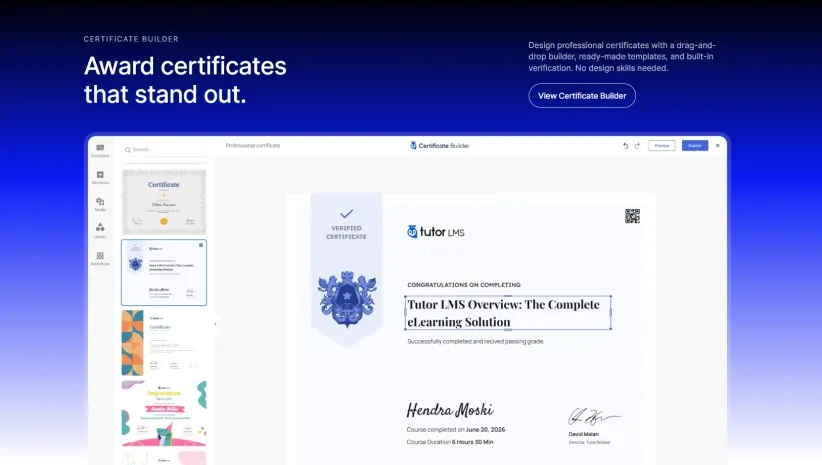
Built-In Certificate Builder
Certificates can add value to an online course by recognizing students who successfully complete their learning programs. Tutor LMS provides a certificate builder that allows administrators to design customized course completion certificates.
You can use pre-designed templates, add your branding, customize text, and include relevant student and course information. The certificate verification functionality also helps recipients demonstrate that their certificates were issued through your learning platform.
For businesses offering professional development programs, certification courses, or skill-based training, this feature can improve the overall learning experience.
Video Lessons and Content Protection
Video is one of the most common formats used in online education. Tutor LMS supports multiple video sources, including:
- Self-hosted video.
- YouTube.
- Vimeo.
- Embedded video sources.
- Supported external video hosting services.
It also offers content protection options designed to make unauthorized access and casual downloading more difficult. For websites hosting a large collection of premium video lessons, external video hosting services such as Bunny.net can be useful for managing video delivery.
Keep in mind that browser-level restrictions cannot guarantee complete protection against screen recording or unauthorized copying. If video security is a major concern, consider using a dedicated video hosting service with appropriate access controls.
Content Drip
Releasing every lesson immediately isn’t always the best approach to online education. Tutor LMS Pro includes a Content Drip add-on that allows course creators to control when students gain access to learning materials.
You can configure content release in several ways:
- Scheduled Release: Make lessons available on specific dates.
- Enrollment-Based Release: Unlock lessons after a certain number of days from enrollment.
- Sequential Release: Make the next learning activity available after students complete the previous one.
- Prerequisite-Based Release: Require students to complete selected lessons or activities before accessing additional content.
Content Drip is particularly useful for structured training programs, membership-based learning platforms, and courses designed to guide students through a specific learning journey.
Multi-Instructor Support
Tutor LMS supports multi-instructor functionality, making it possible to build a course marketplace with multiple teachers. Instead of managing every course yourself, you can allow instructors to register, create courses, and contribute educational content to your platform.
Depending on your configuration, you can also manage instructor permissions, course collaboration, revenue allocation, and commission settings. This makes Tutor LMS a suitable option for entrepreneurs who want to create an educational marketplace similar in concept to Udemy.
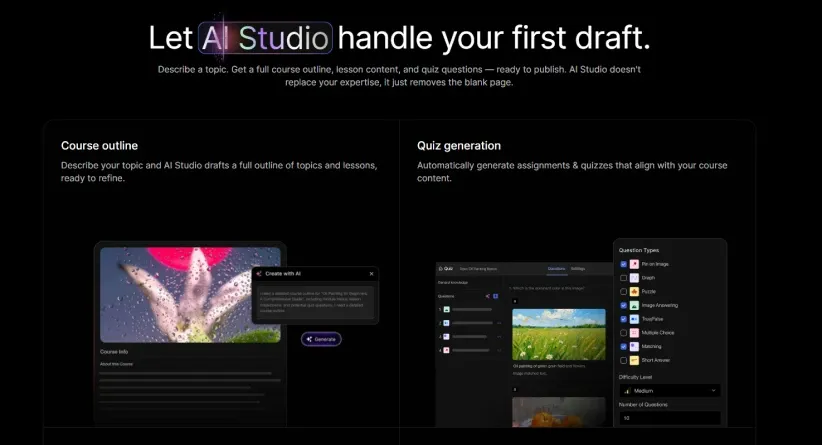
AI-Powered Course Creation
Tutor LMS also offers AI-powered capabilities through its AI Studio. These tools are designed to assist with creating educational content, including course materials and quizzes.
AI-assisted workflows can help instructors develop initial course structures and learning resources more efficiently. However, generated content should always be reviewed and edited to ensure accuracy, originality, and educational quality. For creators who regularly publish courses, AI assistance can be a useful addition to the traditional course creation workflow.
4. Selling Courses and Monetization Options
Creating educational content is only one part of running an online learning business. You also need a reliable way to sell courses and collect payments. Tutor LMS provides built-in eCommerce functionality, allowing you to manage course sales directly through your WordPress website.
Native eCommerce
One of the useful additions to Tutor LMS is its native eCommerce system. It allows course creators to manage essential selling activities without relying entirely on an external shopping cart plugin.
Depending on the supported payment methods and regional availability, you can configure payment processing, course pricing, orders, discounts, and taxes.
WooCommerce Integration
If your website already uses WooCommerce, Tutor LMS can integrate with it to manage course purchases. This is particularly useful for businesses that sell both physical and digital products alongside online courses.
WooCommerce also provides access to a wider ecosystem of payment gateway extensions, making it easier to support different payment methods and regional requirements.
Memberships and Subscriptions
For businesses that prefer recurring revenue instead of selling individual courses, Tutor LMS supports membership and subscription-based learning models. You can create an educational website where members pay regularly to access selected courses or learning resources.
Supported integrations and subscription options include WooCommerce Subscriptions and Paid Memberships Pro.
Tutor LMS includes built-in eCommerce functionality for selling courses directly from your website. You can also explore other WordPress eCommerce solutions like SureCart to understand alternative ways to manage online payments and subscriptions.
Multi-Instructor Revenue Sharing
If you’re building a multi-instructor marketplace, managing instructor earnings becomes an important part of your business operations. Tutor LMS provides earning and commission allocation functionality that helps administrators manage revenue distribution among instructors.
You can configure commission arrangements and manage instructor-related earnings through the available marketplace tools. This reduces the need to handle every financial calculation manually.
5. Tutor LMS Integrations and Compatibility
A WordPress LMS rarely operates in isolation. You may need additional tools for website design, payment processing, video hosting, marketing automation, and student communication. Tutor LMS supports integrations with several popular WordPress plugins and external services.
Some notable integrations include:
| Category | Supported Tools |
|---|---|
| Page Builders | Elementor, Divi, Oxygen |
| eCommerce | WooCommerce, Easy Digital Downloads |
| Membership | Paid Memberships Pro, Restrict Content Pro |
| Live Classes | Zoom, Google Meet, Jitsi Meet |
| Community | BuddyPress, BuddyBoss |
| Video Hosting | Bunny.net |
| Automation | Uncanny Automator, AutomatorWP |
| Learning Content | H5P, GrassBlade xAPI Companion |
The availability of individual integrations may depend on the Tutor LMS version, add-ons, and third-party plugin requirements. This flexibility is useful for businesses that want to build a customized learning platform rather than rely on a fixed, hosted course system. You can also explore the official Tutor LMS integrations page for the latest compatibility information.
Tutor LMS works with popular WordPress tools and page builders to extend its functionality. If you’re exploring ways to customize your website, check out our Kirki WordPress review for more insights into WordPress customization.
6. Tutor LMS Free vs Pro
One of the most common questions potential users ask is whether the free version of Tutor LMS is sufficient or whether upgrading to Pro is necessary. The answer depends on the type of learning platform you want to build.
The free version provides a useful starting point for creating courses, managing students, building quizzes, and selling educational content. However, businesses that require advanced course management, content scheduling, certificates, assignments, and reporting will benefit from the Pro version.
Here’s a general comparison:
| Features | Free | Pro |
|---|---|---|
| Course Creation | Yes | Yes |
| Unlimited Courses | Yes | Yes |
| Student Dashboard | Yes | Yes |
| Instructor Dashboard | Yes | Yes |
| Basic Quiz Builder | Yes | Yes |
| Advanced Quiz Features | Limited | Yes |
| Native eCommerce | Yes | Yes |
| WooCommerce Integration | Yes | Yes |
| Frontend Course Builder | No | Yes |
| Content Drip | No | Yes |
| Course Prerequisites | No | Yes |
| Certificate Builder | No | Yes |
| Assignments | No | Yes |
| Gradebook | No | Yes |
| Advanced Reports | Limited | Yes |
| Multi-Instructor Features | Basic support | Advanced options |
| Live Class Integrations | Pro add-ons | Yes |
Note: Some advanced capabilities are delivered through optional Pro add-ons. Feature availability can change between releases, so check the official comparison page before purchasing.
For a basic online course website, the free version may be enough to get started. But if you’re planning a professional eLearning business, Tutor LMS Pro offers considerably more flexibility. You can review the complete Tutor LMS Free vs Pro comparison before choosing a plan.
7. Tutor LMS Performance and Reliability
Website performance is an important consideration when choosing a WordPress LMS plugin. An online learning platform may handle multiple students, course enrollments, video lessons, quiz submissions, and progress updates. As these activities increase, server resources and website configuration become increasingly important.
Tutor LMS provides a comprehensive collection of course management tools, but its actual performance depends on several factors, including:
- WordPress hosting quality.
- Server resources and database configuration.
- Number of active students.
- Course content and media delivery methods.
- Other installed plugins and theme functionality.
- Caching and optimization settings.
For websites with extensive video libraries, using a dedicated video hosting service can reduce the amount of media processing handled by the WordPress server. Similarly, choosing reliable hosting and configuring caching appropriately can help maintain a responsive experience.
It’s important not to assume that any LMS plugin will remain fast under every workload. If you’re planning a large educational platform, test important student and instructor workflows under conditions similar to your expected usage.
Your website’s performance depends heavily on hosting quality, especially when managing multiple courses and students. Choosing reliable WordPress hosting can help maintain a smoother learning experience as your platform grows.
8. Tutor LMS Pricing and Plans
Tutor LMS offers a free version alongside several premium licensing options. The free plugin is available through the WordPress.org plugin directory and provides the core functionality needed to start creating and selling courses. For users who need advanced features, Tutor LMS Pro offers additional capabilities through its paid plans.
According to the official pricing page, the annual plans start at:
| Plan | Website License | Starting Annual Price |
|---|---|---|
| Individual | 1 Website | $199/year |
| Business | 10 Websites | $399/year |
| Agency | Unlimited Websites | $799/year |
Tutor LMS also offers lifetime licensing options for users who prefer a one-time payment instead of annual renewals.
The premium plans are designed for different types of users:
- Individual: Suitable for solo instructors and businesses operating a single learning website.
- Business: A practical option for agencies and businesses managing multiple educational websites.
- Agency: Designed for developers and agencies working with multiple client projects.
Prices, licensing terms, promotional offers, and included benefits may change. Check the official Tutor LMS pricing page for the latest details before purchasing.
Is Tutor LMS Pro Worth the Price?
For someone launching a simple online course, the free version may be sufficient. However, if you need features such as advanced course building, certificates, content drip, assignments, reporting, and additional integrations, upgrading to Pro can provide considerably more flexibility.
The value ultimately depends on which features your business actually needs. There’s little reason to purchase an advanced plan if your website only requires basic course publishing and student enrollment.
9. Tutor LMS Alternatives
Tutor LMS is a capable WordPress learning management solution, but it isn’t the only option available. Depending on your requirements, you may also want to consider other LMS plugins.
LearnDash
LearnDash is a popular premium WordPress LMS plugin designed for building structured online learning platforms. It offers course creation tools, quizzes, assessments, learning management functionality, and integrations for expanding an educational website. LearnDash is worth considering if you want an established LMS solution with extensive course management capabilities.
LearnPress
LearnPress is another WordPress LMS plugin that provides a free starting point for creating and managing online courses. It offers course creation, lessons, quizzes, and additional functionality through its available add-ons. It’s worth exploring if you’re looking for a budget-conscious way to start an online learning website.
LifterLMS
LifterLMS focuses on online courses, memberships, and educational programs.It provides tools for creating courses, managing students, delivering learning content, and building membership-based learning experiences. It may be a suitable alternative for coaches, educators, and businesses that want to combine online courses with membership functionality.
Tutor LMS vs Other LMS Plugins
Each plugin has its own strengths, pricing structure, and feature set.
| LMS Plugin | Best For |
|---|---|
| Tutor LMS | Flexible course websites and multi-instructor marketplaces |
| LearnDash | Advanced structured learning platforms |
| LearnPress | Budget-conscious course websites |
| LifterLMS | Membership-based education and online courses |
The best choice depends on your preferred workflow, budget, required integrations, and long-term business goals. Before making a decision, compare the features and pricing of each plugin based on your actual requirements.
10. Who Should Use Tutor LMS?
Tutor LMS is designed for a wide range of educational projects. Its combination of course creation, student management, and monetization tools makes it useful for different types of users. Here are some examples of who may benefit from it.
Independent Instructors and Course Creators
If you’re an individual educator who wants to sell courses under your own brand, Tutor LMS provides the tools to publish lessons, manage enrollments, and monetize your expertise.
Schools and Educational Institutions
Schools, academies, and training centers can use Tutor LMS to organize learning materials, manage students, conduct assessments, and provide course completion certificates.
Coaching and Training Businesses
Coaches and professional trainers can create structured programs, deliver video lessons, evaluate student progress, and offer subscription-based access.
Companies and Corporate Training Teams
Businesses can use an LMS website to organize employee training, onboarding materials, internal educational resources, and professional development programs.
Online Course Marketplace Founders
Entrepreneurs who want to build a multi-instructor education marketplace can use Tutor LMS to manage multiple instructors, courses, and revenue allocation.
However, larger organizations with complex learning management, compliance, or enterprise reporting requirements should evaluate the plugin carefully before making it their primary platform.
11. Frequently Asked Questions About Tutor LMS
Is Tutor LMS free?
Yes. Tutor LMS offers a free version that you can download from WordPress.org. It includes core course creation, student management, quizzes, and course-selling functionality. Advanced capabilities are available through the Pro version and its add-ons.
Is Tutor LMS good for beginners?
Yes. Tutor LMS provides an organized course management interface, frontend dashboards, and course creation tools that make it accessible to beginners. However, building a complete learning platform may still require some WordPress knowledge and configuration.
Can I sell courses with Tutor LMS?
Yes. Tutor LMS includes native eCommerce functionality that allows you to sell online courses directly from your WordPress website. You can also use supported integrations such as WooCommerce and Easy Digital Downloads.
Does Tutor LMS support multiple instructors?
Yes. Tutor LMS supports multi-instructor functionality. With the appropriate Pro features and configuration, you can allow multiple instructors to contribute courses and manage their teaching activities.
Does Tutor LMS support live classes?
Yes. Tutor LMS supports live-class integrations through services such as Zoom, Google Meet, and Jitsi Meet. Some integrations require activating the relevant Pro add-on.
Can I create certificates with Tutor LMS?
Yes. Tutor LMS offers certificate functionality, including a customizable certificate builder and verification options. Advanced certificate design features are available through the Pro version.
Is Tutor LMS better than LearnDash?
Neither plugin is automatically better for every project. Tutor LMS offers a flexible course management experience and multi-instructor functionality, while LearnDash is another established option for structured online learning. Your choice should depend on your feature requirements, budget, and preferred workflow.
Does Tutor LMS work with Elementor?
Yes. Tutor LMS supports Elementor integration, allowing you to design and customize supported course-related pages and elements using the page builder.
Can I build a website like Udemy with Tutor LMS?
Yes. Tutor LMS supports multi-instructor course marketplaces, allowing different teachers to publish and manage courses on a single WordPress website. However, building a marketplace like Udemy also requires thoughtful planning for instructor onboarding, commissions, payments, moderation, and platform management.
12. Final Words: Is Tutor LMS Worth It in 2027?
Tutor LMS is a strong option for anyone looking to build an online learning platform using WordPress. Its combination of course creation tools, student and instructor dashboards, quiz management, certificates, monetization options, and third-party integrations makes it a flexible solution for different educational business models.
The availability of a free version is another advantage, allowing beginners to explore the platform before investing in a premium license. However, some advanced capabilities require Tutor LMS Pro or additional add-ons. Businesses planning to build larger educational platforms should also consider hosting requirements, integration compatibility, and ongoing maintenance.
So, is Tutor LMS worth using in 2027?
For independent educators, coaching businesses, training centers, and entrepreneurs building a WordPress-based course marketplace, Tutor LMS is certainly worth considering.
It provides a practical foundation for creating and managing online courses while giving businesses room to expand as their educational offerings grow. If you’re looking for a flexible WordPress LMS plugin with a free starting point and a broad set of premium capabilities, Tutor LMS deserves a place on your shortlist.