

Building a WordPress website used to require a good understanding of HTML, CSS, PHP, and other web technologies. Today, you can create professional websites visually without writing code for every layout or design change.
A WordPress visual page builder gives you a visual workspace where you can add elements, change layouts, adjust styles, and see your design while you work. This can make website creation much easier for beginners while also giving experienced designers and developers more flexibility.
There are many approaches to visual website building in WordPress. Traditional page builders usually organize content into sections, rows, columns, and elements. Newer tools are taking a more flexible approach with freeform canvases, responsive controls, dynamic content, animations, and built-in website features.
One example is Kirki, which has evolved from its original WordPress Customizer framework into a freeform visual website builder while continuing to preserve its Customizer functionality.
In this guide, we’ll explain what a WordPress visual page builder is, how it works, its main benefits, what to look for when choosing one, and how Kirki fits into the modern WordPress website-building workflow.
What Is a WordPress Visual Page Builder?
A WordPress visual page builder is a plugin or website-building tool that lets you design WordPress pages visually instead of manually writing code for every part of the layout. Depending on the builder, you can add and arrange:
- Text
- Images
- Buttons
- Sections
- Columns
- Forms
- Videos
- Galleries
- Navigation elements
- Dynamic content
- Interactive elements
You can then adjust colors, typography, spacing, backgrounds, sizing, and other design settings through visual controls. The main idea is simple: you build the page while seeing how it looks. This is often described as a WYSIWYG approach, which means “What You See Is What You Get.”
For example, instead of writing CSS to change the spacing around a button, you can select the button and adjust its padding or margin through the builder’s interface.
How Does a WordPress Visual Page Builder Work?
Although each builder has its own interface, the general workflow is similar:
- Create or open a WordPress page.
- Launch the visual builder.
- Add elements or sections to the page.
- Arrange them visually.
- Customize typography, colors, spacing, backgrounds, and other styles.
- Adjust the design for different screen sizes.
- Preview the page.
- Publish the finished design.
Some builders use a traditional section-and-column system, while newer tools can provide a more flexible canvas. The important difference is that you don’t have to switch constantly between writing code and checking the front end. The visual interface lets you make many design changes directly.
Key Benefits of a WordPress Visual Page Builder
Visual page builders have become popular because they simplify many common website-building tasks.
1. Less Coding Required
One of the biggest advantages is that you can create many website layouts without manually writing HTML and CSS. This makes visual builders useful for:
- Beginners
- Bloggers
- Small businesses
- Freelancers
- Designers
- Marketing teams
- Website owners
Coding knowledge can still be useful for advanced customization, troubleshooting, and development work, but it is not required for many everyday design tasks.
2. Visual Editing
Instead of guessing how a design will look after changing code, you can make adjustments inside the visual editor and immediately see the result. For example, you can change:
- Font size
- Font family
- Text color
- Background color
- Padding
- Margin
- Width
- Height
- Alignment
This makes the design process more intuitive.
3. Faster Page Creation
Many visual builders include ready-made sections, templates, components, or reusable elements. Instead of creating every page from a blank canvas, you can start with an existing layout and customize it. This can save time, particularly when creating common pages such as:
- Homepages
- Service pages
- Landing pages
- About pages
- Contact pages
- Product pages
The actual time savings depend on the complexity of the project and the builder you choose.
4. Responsive Design Controls
A modern website needs to work across different screen sizes. Many WordPress visual page builders provide responsive controls for desktop, tablet, and mobile layouts. Depending on the builder, you may be able to adjust:
- Font sizes
- Spacing
- Element width
- Positioning
- Visibility
- Layout behavior
Some newer builders go further by supporting custom breakpoints and more detailed responsive controls.
5. Reusable Designs
Some builders let you save sections, components, or complete templates and reuse them across your website. This is useful when you want to maintain a consistent design across multiple pages. For example, you might create one call-to-action section and reuse it across several landing pages instead of rebuilding it each time.
Popular WordPress Visual Page Builder Options
WordPress has a large ecosystem of visual website-building tools. Some well-known options include:
- Elementor
- Beaver Builder
- Divi
- Bricks
- WordPress Block Editor
- Kirki
These tools don’t all follow the same design philosophy. Some use a traditional section-and-column workflow. Others focus on blocks or more developer-oriented systems. Kirki takes a different approach with a freeform visual canvas designed to give users more freedom over positioning and layout.
If you want to compare different options, you can also read our guide to the best WordPress page builders.
What Makes Kirki Different?
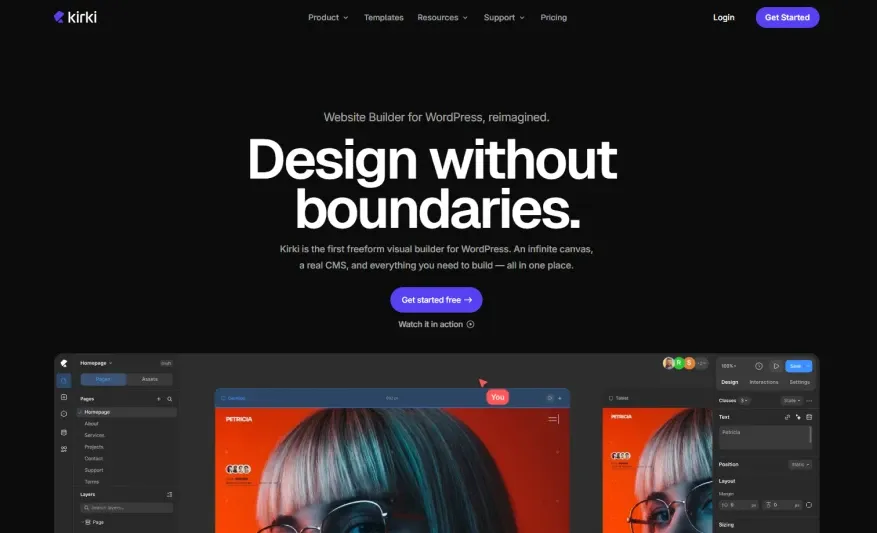
Kirki is an interesting example of how WordPress visual website building is evolving. Originally known primarily as a WordPress Customizer framework, Kirki has expanded into a freeform visual website builder. Its current product combines the visual builder with its existing Customizer functionality.
Instead of limiting every design to a rigid:
Section → Row → Column → Element
structure, Kirki provides an infinite freeform canvas where elements can be positioned and designed more freely. This makes it closer to modern visual design tools while still operating inside WordPress.
Kirki’s Freeform Visual Canvas
The freeform canvas is one of Kirki’s main differences. Instead of forcing every design into predefined rows and columns, you can work with a more open canvas and control the position, size, styling, and relationships between elements.
Kirki also provides responsive editing and supports unlimited breakpoints, allowing designs to be adjusted for different viewport sizes. This approach can be particularly interesting for designers who want more freedom than a traditional page-builder workflow provides.
Built-In CMS and Dynamic Content
Kirki is not limited to static page design. Its current feature set includes a built-in CMS with features such as content management, custom fields, dynamic templates, references, scheduling, filtering, and pagination.
That means you can use dynamic WordPress content rather than designing every page as a completely separate static layout. For example, dynamic templates can be useful when building websites that contain many similar content items.
Responsive Editing and Breakpoints
Responsive design is an important part of modern WordPress development. Kirki includes responsive editing and unlimited breakpoints, allowing designers to adapt layouts for different screen sizes.
This gives you more control than simply designing a desktop page and hoping it automatically looks good on mobile. However, responsive controls don’t remove the need for testing. You should still check your finished website on different screen sizes before publishing.
Interactions and Animations
Some modern websites need more than static layouts. Kirki includes interaction and animation tools, including a visual interaction timeline. Its official feature list includes interactions triggered by actions such as scrolling, clicking, hovering, and mouse movement, along with text animations and Lottie support.
These features can help designers create more interactive experiences without relying entirely on separate animation plugins. However, animations should be used carefully. Too many effects can make a website distracting or negatively affect the user experience.
Forms, Popups, SEO and Built-In Tools
Another part of Kirki’s current approach is reducing the need for separate plugins for certain functions. The official site lists built-in features such as forms, popups, maps, SEO tools, icons, image optimization, and more than 20 built-in app integrations.
The advantage is convenience: some functionality that would traditionally require additional WordPress plugins can be handled within the builder. However, this doesn’t mean every website should remove all third-party plugins. You should still choose tools based on the features, reliability, compatibility, and maintenance requirements of your particular project.
Figma to Kirki and Other Imports
Kirki also supports importing designs from Figma, HTML, and existing builders according to its current website. The goal is to make migration and design transfer easier while preserving elements such as styles, spacing, and layouts. The Figma importer can be particularly useful for designers who create website layouts in Figma before implementing them in WordPress. Kirki also provides full site import/export functionality.
Collaboration for Teams and Clients
Visual website building isn’t always a one-person process. Kirki includes collaboration features such as multiple editors working on the same canvas, comments, staging, publish history, and client view-only links. Pro and higher plans also include additional collaboration and developer workflow features.These features can be useful for freelancers and agencies that need to work with clients or other team members.
Kirki vs. Traditional WordPress Visual Page Builders
Kirki and traditional visual page builders can overlap in some areas, but their approach is different.
| Feature | Traditional Visual Page Builder | Kirki |
|---|---|---|
| Visual editing | Yes | Yes |
| Drag-and-drop design | Common | Yes |
| Page layouts | Yes | Yes |
| Freeform canvas | Usually limited or unavailable | Core feature |
| Responsive editing | Yes | Yes |
| Global styles | Usually available | Yes |
| Dynamic content | Depends on builder | Yes |
| CMS features | Depends on builder/plugins | Built-in CMS |
| Interactions | Depends on builder | Built-in |
| Forms | Often available | Built-in |
| Popups | Often available | Built-in |
| Figma import | Depends on builder | Available |
| Traditional Customizer framework | Depends on builder | Built into Kirki |
| Collaboration | Depends on builder/plan | Available on paid plans |
The important point is that Kirki is not simply another copy of the traditional page-builder model. Its current approach combines freeform visual design, WordPress customization, dynamic content, interactions, and website-building features in one system.
Is Kirki Free or Premium?
Yes. Kirki currently offers a free version that is available through WordPress.org. The official pricing page lists the Free plan at $0/year and says it includes features such as the infinite freeform canvas, responsive editing, 35+ Customizer controls, basic interactions, staging mode, form builder, full site import/export, Figma import, and starter templates.
There are also paid plans for users who need more advanced functionality.
Kirki Pro adds features including the Kirki CMS, full interaction timeline, popup builder, premium templates, real-time collaboration, Dev Mode, and additional workflow features. Because pricing and promotions can change, it’s best to check the official Kirki pricing page before making a purchase decision.
How to Choose a WordPress Visual Page Builder
Choosing a builder should depend on your website rather than simply choosing the tool with the longest feature list.
Consider Your Design Workflow
If you prefer traditional sections, rows, and columns, a conventional page builder may feel more familiar. If you want more freedom to position elements visually, a freeform builder may be worth considering.
Check Responsive Controls
Make sure the builder gives you enough control over desktop, tablet, and mobile layouts.
Look at Performance
A page builder can affect the structure and assets of a website, but overall performance depends on many factors. Hosting, themes, plugins, images, fonts, caching, scripts, and website configuration can all affect loading speed. So don’t assume that simply choosing one builder guarantees a fast website.
Check Templates and Components
Ready-made templates can save time, especially if you’re building multiple websites or landing pages.
Consider Built-In Features
If a builder already includes forms, popups, dynamic content, animations, or other functionality you need, it may reduce your dependence on additional plugins. However, compare those features carefully before replacing established tools.
Think About Long-Term Maintenance
A website is not finished when you publish it. You also need to consider updates, compatibility, security, backups, performance, and how easy it will be to maintain the site in the future.
How to Build a Better WordPress Visual Workflow
A good visual workflow is about more than choosing a page builder. Here is a practical approach:
1. Plan the Website First
Decide what pages, content types, navigation, and design system you need before building everything visually.
2. Establish Your Design System
Choose your main colors, fonts, spacing, button styles, and other global design rules.
3. Build Reusable Elements
Create reusable sections or components where possible instead of rebuilding the same design repeatedly.
4. Design for Mobile Early
Don’t wait until the end to check mobile layouts. Review your design at different viewport sizes as you build.
5. Keep Plugins Under Control
If your builder already provides a feature you need, you may not need another plugin that does exactly the same thing. Fewer overlapping tools can make a WordPress installation easier to manage, although the right number of plugins depends on the project.
6. Test Before Publishing
Check:
- Mobile responsiveness
- Page speed
- Navigation
- Forms
- Links
- Images
- Accessibility
- SEO settings
- Browser compatibility
A visually attractive website still needs to work properly for real visitors.
Frequently Asked Questions
1. What is a WordPress visual page builder?
A WordPress visual page builder is a tool that lets you create and customize website pages through a visual interface instead of manually coding every part of the layout. Depending on the builder, you can arrange elements, change styles, create responsive layouts, and use ready-made templates.
2. Is Kirki a WordPress visual page builder?
Yes. The current Kirki product is positioned as a freeform visual website builder for WordPress. It combines a visual builder with its existing WordPress Customizer functionality and adds features such as responsive editing, dynamic content, interactions, forms, and other website-building tools.
3. What makes Kirki different from traditional page builders?
One of Kirki’s main differences is its freeform visual canvas. Instead of relying entirely on the traditional section-row-column approach, it allows designers to work on an open canvas with more flexible positioning and responsive controls.
4. Is Kirki free?
Yes. Kirki has a free version available through WordPress.org. The free plan includes the core visual builder and several other features, while paid plans add advanced capabilities such as the Kirki CMS, full interaction timeline, popup builder, premium templates, and collaboration tools.
5. Do I need coding knowledge to use a WordPress visual page builder?
Many visual page builders are designed to reduce the need for coding, and Kirki describes its visual builder as a no-code website-building tool. However, coding knowledge can still be useful for advanced customization, troubleshooting, integrations, and development work.
6. Can a WordPress visual page builder affect website performance?
It can, but the effect depends on the specific builder and how the website is built. Themes, plugins, images, hosting, caching, scripts, fonts, and other factors also contribute to overall performance. A good workflow is to test your complete website rather than judging performance from the builder alone.
Final Thoughts
A WordPress visual page builder can make website creation much easier by allowing you to design pages visually instead of manually coding every layout.
Traditional page builders remain useful for people who prefer structured sections, columns, templates, and familiar drag-and-drop workflows. Newer tools are taking a different approach by providing more flexible design systems and freeform canvases.
Kirki is one example of this newer approach. It has evolved from its original WordPress Customizer framework into a freeform visual website builder while keeping its Customizer functionality. Its current feature set includes responsive editing, dynamic content, interactions, forms, popups, Figma import, collaboration, and other website-building tools.
The best choice ultimately depends on your project. Before choosing a builder, consider its editing experience, responsive controls, performance, templates, built-in features, compatibility, pricing, and long-term maintenance.
For anyone looking for more freedom than a traditional WordPress page-building workflow provides, Kirki is certainly worth exploring.