

Looking for the best PDF viewer for WordPress? Whether you want to display an eBook, publish an interactive digital magazine, share business reports, or organize hundreds of downloadable documents, the right plugin can make your website more useful and easier to navigate.
WordPress lets you upload PDF files to your media library, but simply linking to a PDF is not always the best experience. Visitors may have to open a separate browser tab, download the document, or work with a viewer that does not match your website’s layout.
A dedicated WordPress PDF viewer plugin can help you embed documents directly into your pages, provide reading controls, create interactive flipbooks, or build searchable document libraries.
However, not every PDF plugin serves the same purpose. Some focus on straightforward PDF embedding, while others offer advanced presentation features, analytics, or document management.
In this guide, we’ll compare 12 WordPress PDF viewer plugins, explain what each option is best suited for, and highlight the factors to consider before choosing one.
Quick Comparison of the Best WordPress PDF Viewers
| Plugin | Best For | Pricing Model | Main Strength |
|---|---|---|---|
| TNC FlipBook 3D | Interactive eBooks and digital publications | Free and paid | Realistic 3D page-turning and multiple reading modes |
| PDF Embedder | Everyday PDF embedding | Free and paid | Responsive inline PDF viewing |
| EmbedPress | Websites with different types of embedded content | Free and paid | Embedding PDFs alongside other media |
| Document Library Pro | Large document collections | Paid | Searchable and filterable document libraries |
| PDF.js Viewer | Customizable PDF reading | Free | Mozilla PDF.js rendering with shortcode and block support |
| FlowPaper | Digital magazines and catalogs | Free plugin and paid options | Web-based publishing and optimized document delivery |
| PDF Poster | Multiple PDF presentation styles | Free and paid | PDF viewer, flipbook, slider, and popup options |
| 3D FlipBook | Interactive digital publications | Free and paid | Three-dimensional page-turning effects |
| Algori PDF Viewer | Gutenberg-based websites | Free version available | Block-based PDF embedding |
| Wonder PDF Embed | Simple PDF embedding | Free plugin | PDF.js-based document viewing |
| FileBird Document Library | Organized document collections | Free and paid options | Front-end document galleries |
| Eledo PDF Embedder | A specialized PDF embedding option | Verify current terms | Consider only after verifying its current features and maintenance |
Quick recommendation: For interactive digital publications, consider TNC FlipBook 3D or 3D FlipBook. For straightforward document embedding, compare PDF Embedder, PDF.js Viewer, and PDF Poster. For searchable collections of documents, look at Document Library Pro or FileBird Document Library.
The best option depends on how your visitors need to read, navigate, and access your documents.
How We Evaluated These WordPress PDF Viewer Plugins
Choosing a PDF plugin involves more than comparing feature lists. A plugin with dozens of features may be unnecessary for a simple website, while a basic embedder may not be sufficient for a publisher or business.
When comparing these options, consider the following criteria.
PDF display and reading experience: Can visitors read documents directly on the page? Does the plugin offer useful navigation, zoom, search, or fullscreen controls?
Mobile responsiveness: Does the viewer adapt to smaller screens? Test portrait and landscape documents on phones and tablets.
Integration with WordPress: Does the plugin support Gutenberg blocks, shortcodes, or the page builder you already use?
Customization: Can you adjust the viewer’s dimensions, colors, toolbar, or display mode?
Document management: If you publish many PDFs, can you categorize, search, filter, and update them efficiently?
Privacy and content access: Does the solution require a third-party service? Can you restrict access to documents? Are the protection features appropriate for your requirements?
Performance: How does the plugin behave with large documents? Check page loading, mobile usability, and Core Web Vitals on your own website.
Pricing and support: Identify which features are included in the free version and which require a paid plan. Check current compatibility, documentation, updates, and support before installing.
This guide is a feature-based comparison, not a claim that all 12 plugins were independently benchmarked under identical conditions. Verify current functionality and test your preferred plugin on a staging website before using it on a production site.
1. TNC FlipBook 3D
Best for: Interactive eBooks, digital magazines, product catalogs, brochures, and business presentations.
Pricing: Explore the free version or upgrade to Pro for more features.
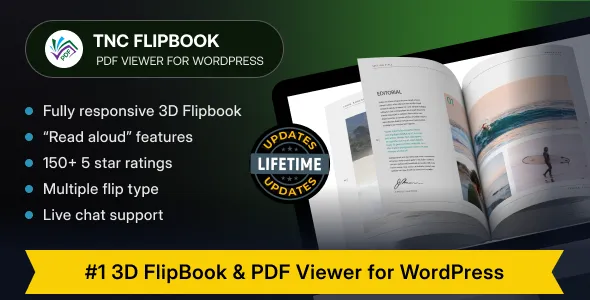
TNC FlipBook 3D is a WordPress PDF viewer and flipbook plugin designed for websites that want to present documents as interactive reading experiences rather than ordinary file embeds.
It converts PDFs and supported images into digital publications with realistic three-dimensional page-turning effects. Visitors can browse the document, search its text, navigate between pages, Flipbook With Sound and switch between different viewing modes.
Unlike a basic PDF embedder, TNC FlipBook 3D focuses on both document readability and visual presentation. This makes it worth considering for publishers, businesses, educational websites, and product-focused websites that want a more engaging way to display long-form content.
Key Features
- Realistic 3D page-turning effects powered by WebGL and Three.js.
- PDF and image-based flipbooks.
- Multiple reading modes, including 3D, vertical scrolling, horizontal scrolling, and reading mode.
- Text search, clickable PDF links, thumbnails, and document navigation.
- Dark and light viewer themes.
- Responsive layouts and right-to-left language support.
- Gutenberg blocks and shortcode integration.
- Premium features including advanced content protection, watermarks, interactive hotspots, read-aloud, and Google Analytics 4 integration.
Feature availability varies between the free and Pro versions, so check the official feature list before choosing a plan.
Pros
- Creates realistic 3D page-turning effects.
- Offers multiple reading modes.
- Combines PDF viewing and digital publishing.
- Enhances branding, engagement, and analytics.
- Supports popular page builders and Gutenberg.
- Offers flexible customization options.
- Includes a free version with Pro upgrades.
Cons
- Advanced features require the Pro version.
- Accessibility Tools are available in the Pro version.
- Interactive Hotspots and Form Filling Support require a Pro upgrade.
- AI Voice Read Aloud and Multi-PDF Support are premium features.
- Content Protection and WooCommerce Gating are available only in Pro.
- Google Analytics 4 Integration and Video Embedding require Pro.
- Multiple Color Schemes and Light/Dark Mode are premium features.
At a Glance: TNC FlipBook 3D is a strong option if presentation quality and interactive reading are priorities. If you only need a basic inline PDF viewer, a simpler plugin may be sufficient.
2. PDF Embedder
Best for: Blogs, business websites, resource pages, and websites that need straightforward PDF embedding.
Pricing: Free version available; premium plans offer additional features.
PDF Embedder is designed to display PDFs directly inside WordPress posts and pages. Instead of relying on a plain download link, you can place a document within your content so visitors can read it without immediately leaving the page.
The plugin offers a responsive viewer that adjusts to the available content width. Its approach is useful when your main goal is to make documents accessible within an existing article, landing page, or resource section.
PDF Embedder also serves files from your website rather than relying on Google Docs Viewer or another external viewing service, according to its official WordPress listing.
Key Features
- Inline PDF embedding.
- Responsive viewer dimensions.
- PDF display within posts and pages.
- A workflow designed for WordPress content editors.
- Additional capabilities available through paid plans.
Pros
- Straightforward approach to embedding documents.
- Suitable for everyday business and editorial content.
- Keeps the PDF within the surrounding page experience.
- Does not require a full flipbook interface.
Cons
- Not primarily designed for realistic 3D page-turning effects.
- Advanced features may require a paid plan.
- The right choice depends on whether its viewer controls meet your specific requirements.
At a Glance: PDF Embedder is worth considering if you want a conventional PDF viewer that integrates naturally into your website’s content.
3. EmbedPress
Best for: Websites that embed PDFs alongside videos, documents, spreadsheets, and other external content.
Pricing: Free version available; paid plans offer additional features.
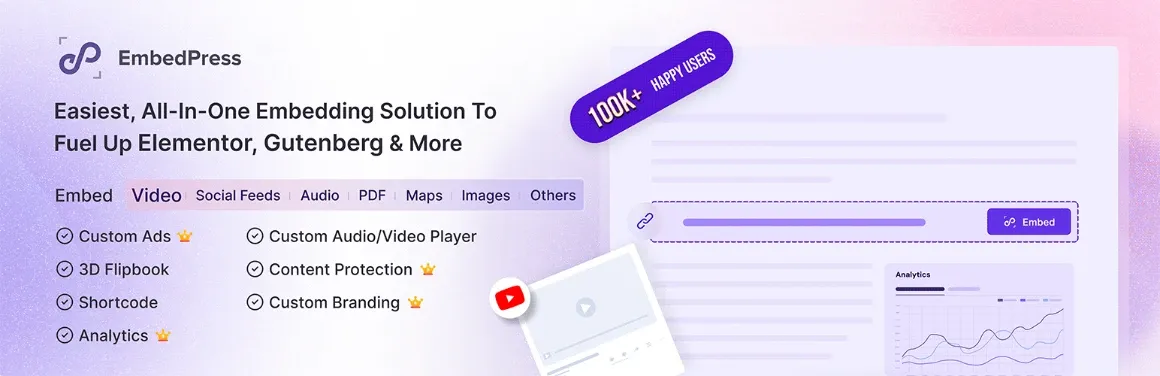
EmbedPress is a broader content-embedding plugin rather than a PDF-only solution. It allows WordPress users to embed content from a variety of external sources and provides additional document-embedding functionality.
This can be useful for educational websites, online publications, business resource centers, and marketing websites that publish several types of media.
For example, a resource page might include a PDF report, a video presentation, a spreadsheet, and supporting documents. Using one embedding solution may simplify that workflow.
Key Features
- PDF and document embedding.
- Support for numerous content sources.
- Integration with WordPress editing workflows.
- Advanced embedding controls through paid plans.
- Additional customization and content-management features, depending on the plan.
Pros
- Useful for websites that publish more than PDFs.
- Reduces the need to choose a separate embedding tool for every content type.
- Suitable for resource-heavy pages and educational content.
Cons
- May include more functionality than a PDF-only website needs.
- Some advanced controls require a paid plan.
- The best experience depends on the external source and content type being embedded.
At a Glance: Consider EmbedPress when your website needs a general-purpose embedding solution, not just a dedicated PDF reader.
4. Document Library Pro
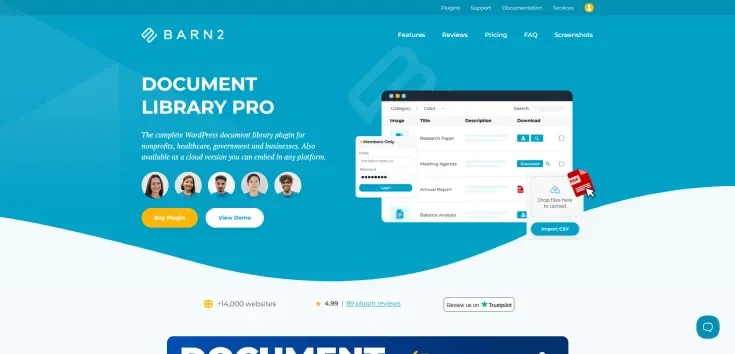
Best for: Businesses, universities, membership websites, and organizations managing large document collections.
Pricing: Paid plugin; check the official website for current plans.
Document Library Pro solves a different problem from a conventional PDF viewer. Rather than focusing on how one PDF looks, it helps you organize and display many documents in a searchable, structured library.
You can use a document library to publish policies, product manuals, reports, research papers, technical documentation, downloadable resources, and other files.
Depending on your configuration, visitors can browse documents in tables or grids, search for specific resources, and filter the collection. The plugin also supports file types beyond PDFs.
Key Features
- Searchable and filterable document libraries.
- Table and grid presentation options.
- Support for multiple document and media types.
- Document categorization and structured organization.
- Preview options and download-related functionality.
- Additional document management and access-control capabilities.
Pros
- Suitable for websites with many files.
- Helps visitors locate specific documents quickly.
- More appropriate for document repositories than a standalone PDF viewer.
- Useful for internal resources, public documentation, and downloadable libraries.
Cons
- May be excessive if you only need to display one or two PDFs.
- A document directory is not the same as a dedicated interactive PDF reader.
- Advanced management features may require configuration.
At a Glance: Choose Document Library Pro if organizing a large collection of files is more important than adding visual page-turning effects to individual PDFs.
5. PDF.js Viewer
Best for: Websites that want a configurable PDF reader based on Mozilla’s PDF.js technology.
Pricing: Free and open source.
PDF.js Viewer integrates Mozilla’s PDF.js viewer into WordPress through a Gutenberg block or shortcode. It is designed for displaying PDF documents directly within website content.
The plugin includes common reading controls such as page navigation, search, fullscreen access, and configurable viewer dimensions. It also supports document outlines and password entry for PDFs that require a document password.
Its shortcode options allow you to adjust settings such as the viewer’s width, height, initial zoom, download button, and print button.
Key Features
- Mozilla PDF.js-based rendering.
- Gutenberg block and shortcode support.
- Elementor widget support.
- Page navigation and search.
- Responsive viewer dimensions.
- Fullscreen access and configurable download and print controls.
- Support for password-protected PDF documents.
Pros
- Free and open source.
- Offers useful reading controls without requiring a 3D flipbook interface.
- Provides shortcode parameters for adjusting the viewing experience.
- Suitable for technical documents, reports, and manuals.
Cons
- Requires some configuration if you want to customize the viewer beyond its defaults.
- Does not focus on realistic page-turning presentation.
- Compatibility and maintenance should be checked before deployment, particularly on websites using recent WordPress updates.
At a Glance: PDF.js Viewer is a practical option for users who want a conventional PDF reading interface with configurable controls.
6. FlowPaper
Best for: Digital magazines, brochures, catalogs, and publication-focused websites.
Pricing: A WordPress plugin is available; additional FlowPaper products and services have their own terms.
FlowPaper focuses on presenting PDF documents as web publications. It is particularly relevant to businesses and publishers that need visitors to explore large catalogs, brochures, magazines, and other visually rich documents.
Its platform includes HTML5-based viewing experiences, zoom functionality, document search, touch interactions, and publishing tools. FlowPaper also emphasizes optimizing document delivery so visitors do not necessarily need to download an entire large document before viewing its content.
Depending on the product and publishing workflow you choose, the experience can extend beyond a basic WordPress embed.
Key Features
- Web-based PDF viewing and publication tools.
- Zooming and document navigation.
- Touch-friendly viewing.
- Customizable publication presentation.
- Tools for optimizing large documents.
- Publishing options for digital magazines and catalogs.
Pros
- Designed with publication-style content in mind.
- Useful for visually rich documents.
- Offers a broader publishing workflow beyond simple embedding.
- Suitable for businesses with catalogs and editorial publications.
Cons
- Different FlowPaper products have different capabilities and pricing.
- May be more than a simple website needs.
- You should confirm hosting, branding, and integration requirements before choosing a plan.
At a Glance: FlowPaper is worth evaluating if you publish large, visually rich digital documents and need a publication-focused experience.
7. PDF Poster
Best for: WordPress users who want several ways to display PDFs through one plugin.
Pricing: Free version available; Pro adds advanced functionality.
PDF Poster offers multiple ways to present PDFs, including a conventional PDF.js viewer, a flipbook, a slider, and popup viewing. This flexibility makes it useful for websites with different types of documents and presentation requirements.
For example, a business might display a product brochure in a flipbook, show a technical report in a conventional viewer, and open a short document in a popup to keep a landing page uncluttered.
The plugin supports Gutenberg blocks and shortcodes, along with controls for viewer dimensions and selected toolbar options.
Key Features
- PDF.js-based viewing.
- Flipbook and slider modes.
- Popup or lightbox viewing.
- Gutenberg block and shortcode support.
- Viewer sizing and toolbar controls.
- Download, print, and fullscreen options.
- Additional analytics and protection functionality, depending on the version.
Pros
- Offers several presentation styles in one plugin.
- Useful for different document types and page layouts.
- Includes a free version with multiple viewing options.
- Allows you to choose between inline display and popup viewing.
Cons
- The range of options may require extra configuration.
- Some advanced features are reserved for Pro.
- Performance depends on the document, display mode, hosting environment, and page configuration.
At a Glance: PDF Poster is a flexible option when you want to experiment with conventional PDF viewing, sliders, flipbooks, and popup presentations without installing a separate plugin for each format.
8. 3D FlipBook
Best for: Interactive portfolios, digital magazines, catalogs, and visually oriented publications.
Pricing: Free version available; paid options may be offered separately.
3D FlipBook by iberezansky is a WordPress plugin for presenting documents as interactive digital books. It supports PDFs, images, and HTML content, depending on the configuration.
Instead of displaying a document as a conventional scrolling reader, the plugin can create a page-turning experience with three-dimensional effects. This presentation style may be appropriate for catalogs, portfolios, brochures, and publications where the visual experience matters.
Key Features
- PDF-based flipbooks.
- Image and HTML content support.
- Three-dimensional page-turning presentation.
- Customizable viewer appearance.
- Interactive document navigation.
- WordPress embedding functionality.
Pros
- Provides a more visual alternative to ordinary PDF embedding.
- Suitable for publications where page-turning effects add value.
- Supports different types of source content.
- Offers a free version to evaluate.
Cons
- A flipbook interface may not be ideal for every document.
- Complex effects should be tested on mobile devices and lower-powered hardware.
- Compare the available customization and support options with your specific needs.
At a Glance: 3D FlipBook is worth considering when you want a book-like digital publication rather than a straightforward document viewer.
9. Algori PDF Viewer
Best for: WordPress websites that primarily use the Gutenberg block editor.
Pricing: A free version is available; verify the current status of any paid edition.
Algori PDF Viewer is designed around a block-based workflow for displaying PDF documents in WordPress. Its main appeal is the ability to place a PDF viewer directly into content through the editor instead of relying exclusively on manual shortcode insertion.
This approach may suit blogs, small business websites, educational resources, and other websites that use the WordPress Block Editor to manage their pages.
Key Features
- Gutenberg block-based PDF embedding.
- PDF display within WordPress content.
- An editor-centered workflow.
- Viewer configuration options, depending on the version.
Pros
- Fits naturally into a block-based editing workflow.
- Can be useful for websites that need straightforward PDF display.
- Does not require a full digital publication platform.
Cons
- Its feature set may not satisfy users who need extensive publication or document-management tools.
- Verify current compatibility, maintenance, and support before installing.
- Do not assume that every feature mentioned in older tutorials is available in the current release.
At a Glance: Algori PDF Viewer may suit a Gutenberg-focused workflow, but check the current plugin listing and test it with your WordPress installation before making it a production dependency.
10. Wonder PDF Embed
Best for: Websites that need a simple PDF.js-based document viewer.
Pricing: The core plugin is available free; related premium products are separate.
Wonder PDF Embed is a lightweight option for embedding PDF documents into WordPress posts and pages. It uses Mozilla’s PDF.js technology and provides a viewer that can be configured with shortcode options.
The plugin can also work with other WonderPlugin products for additional presentation options, including lightbox and carousel functionality. These related capabilities should not be confused with features included in the core free plugin.
Key Features
- PDF.js-based document display.
- Responsive PDF embedding.
- Shortcode-based configuration.
- Options to hide selected toolbar controls.
- Compatibility with related WonderPlugin products for additional presentation features.
Pros
- Suitable for straightforward PDF embedding.
- Uses a familiar PDF reading interface.
- Provides configurable display options.
- Can be useful for websites that do not need a complex document platform.
Cons
- Additional lightbox or carousel functionality may require separate products.
- Hiding viewer controls does not provide comprehensive document protection.
- The same-domain hosting requirements described in the official documentation should be checked before embedding a PDF.
At a Glance: Wonder PDF Embed is worth considering if you want a simple PDF.js viewer and do not need an advanced flipbook or document library.
11. FileBird Document Library
Best for: Websites that need to organize documents into browsable front-end collections.
Pricing: Check the official listing for current free and paid functionality.
FileBird Document Library is designed to turn document collections into a more organized front-end experience. Rather than treating every PDF as an isolated embed, you can present documents in a gallery or library that visitors can browse.
This is particularly useful for resource centers, product documentation, educational websites, and organizations that publish many files.
Its appeal is strongest when document organization matters as much as the files themselves.
Key Features
- Front-end document library presentation.
- Document gallery layouts.
- Integration with WordPress editing workflows.
- Organization and display of document collections.
- Additional features depending on the current version and plan.
Pros
- Useful for publishing many documents in one place.
- Can make resource collections easier to browse.
- More appropriate for document directories than a single-file viewer.
- May fit existing WordPress media organization workflows.
Cons
- A document library is not a replacement for every PDF reader feature.
- The available organization and filtering options should be verified against your requirements.
- Test how the plugin handles your current media folders and document structure before migrating a large collection.
At a Glance: Consider FileBird Document Library when you need a browsable document collection rather than an individual PDF viewer.
12. Eledo PDF Embedder
Best for: Users researching alternative PDF embedding solutions.
Pricing: Verify current pricing, availability, and licensing before choosing.
Eledo PDF Embedder appeared in the original candidate list for this comparison. However, its current product identity, maintenance status, feature availability, and exact relationship with Adobe’s PDF Embed API should be independently confirmed before it is recommended as an established choice.
This distinction matters because a plugin’s name or an older description is not enough to establish which rendering engine it uses or whether a particular feature is currently available.
If you are considering this option, verify the following before installing it:
- Whether the exact plugin is currently available from a trustworthy source.
- Whether it is actively maintained and compatible with your WordPress version.
- Whether the claimed PDF rendering engine is documented by the developer.
- Whether any API keys, usage limits, or external service requirements apply.
- Whether its current features and licensing meet your needs.
Verdict: Treat Eledo PDF Embedder as an option to investigate rather than a fully verified recommendation until its current official documentation and plugin listing have been confirmed.
How to Choose the Best PDF Viewer for WordPress
The right plugin depends on the job you want it to do. Use the following recommendations as a starting point.
For Digital Magazines and Interactive eBooks
Consider TNC FlipBook 3D or 3D FlipBook if you want readers to explore a publication with page-turning effects.
For a conventional reader that does not need a book-like interface, compare PDF Embedder or PDF.js Viewer instead.
For Simple PDF Embedding
PDF Embedder, PDF.js Viewer, Wonder PDF Embed, and PDF Poster are worth comparing when the primary goal is to display a document directly within a page.
Focus on responsive sizing, navigation controls, compatibility, and how the viewer behaves on mobile devices.
For Websites With Different Types of Embedded Content
EmbedPress may be a better fit if your website embeds PDFs alongside videos, spreadsheets, and other supported sources.
This approach is particularly relevant to educational websites, online publications, and content-rich business websites.
For Large Document Collections
Document Library Pro and FileBird Document Library are worth evaluating if you need visitors to search, browse, and organize many files.
Choose a document-management solution based on the number of files you publish, the available filtering options, and whether you need access controls.
For Publication-Focused Websites
FlowPaper is worth considering if your workflow involves digital magazines, large catalogs, and web-based publications.
Compare its publishing workflow, customization options, hosting requirements, and pricing with your other shortlisted solutions.
What to Look for Before Installing a WordPress PDF Plugin
Before committing to a plugin, review these practical considerations.
1. Mobile Responsiveness
A viewer that works on a desktop may not provide the same experience on a phone. Test zooming, page navigation, scrolling, and landscape documents on multiple screen sizes.
2. Website Performance
Large PDFs can affect loading and interaction. Test your selected plugin with representative files and check your page performance before and after installation.
Do not assume that a plugin automatically improves Core Web Vitals simply because it describes itself as lightweight.
3. Accessibility
Consider keyboard navigation, readable controls, screen-reader support, and whether the PDF itself contains properly structured text.
An accessible viewer cannot automatically make an inaccessible or poorly structured PDF accessible.
4. Search and Navigation
For long reports, manuals, and research documents, text search, page navigation, thumbnails, and document outlines can make a meaningful difference.
For short brochures, these features may be less important than appearance and mobile readability.
5. Privacy and Document Security
If documents contain sensitive information, use appropriate access controls and secure file delivery.
Disabling a download button, hiding a print control, or blocking right-click does not guarantee that visitors cannot obtain or copy a PDF. These measures should not be treated as comprehensive digital rights management.
6. Compatibility and Maintenance
Check the plugin’s current WordPress compatibility, update history, documentation, and support options. Test it alongside your theme, page builder, caching plugin, and other important extensions.
7. Free Versus Paid Features
A free plugin may be sufficient for basic embedding, while paid plans may offer additional controls, analytics, customization, or protection features.
Compare the features you actually need rather than paying for a longer feature list.
Frequently Asked Questions
What is the best PDF viewer for WordPress?
There is no single best plugin for every website. TNC FlipBook 3D and 3D FlipBook are options for interactive publications, PDF Embedder and PDF.js Viewer are worth comparing for conventional document embedding, and Document Library Pro is designed for organized document collections.
Can I embed a PDF in WordPress for free?
Yes. Several plugins offer free PDF embedding, including PDF Embedder, PDF.js Viewer, PDF Poster, and Wonder PDF Embed. The exact features available depend on the plugin and its current version.
Which WordPress PDF plugin is best for mobile devices?
Choose a plugin with responsive viewing controls and test it on your own website. Check whether the viewer fits the screen, supports touch navigation, and allows visitors to zoom into text without excessive horizontal scrolling.
Can I create a 3D flipbook in WordPress?
Yes. Plugins such as TNC FlipBook 3D and 3D FlipBook offer flipbook-style PDF presentation. Compare their reading modes, customization options, mobile behavior, and free-versus-paid features before deciding.
Can a WordPress PDF viewer prevent downloads?
Some plugins can hide download buttons or offer additional protection controls. However, hiding a button does not guarantee that a publicly accessible PDF cannot be downloaded, copied, or captured. Sensitive documents require stronger access controls and an appropriate document-delivery strategy.
Does embedding a PDF help SEO?
Embedding a PDF can make a document easier for visitors to access within a relevant page, but embedding alone does not guarantee higher rankings.
Provide useful HTML content around the document, use descriptive headings, ensure the page is accessible and crawlable, and avoid making important information available only inside a PDF when it should also be searchable as web content.
Should I use a PDF viewer or a document library plugin?
Use a PDF viewer when the main goal is to let visitors read an individual document. Use a document library plugin when you need to organize many files into searchable, categorized, or filterable collections. Some websites benefit from using both approaches.
The Bottom Line
The best PDF viewer for WordPress is the one that matches your content, audience, and technical requirements.
If you want to create interactive digital publications, compare TNC FlipBook 3D and 3D FlipBook. If you need straightforward PDF embedding, evaluate PDF Embedder, PDF.js Viewer, and PDF Poster. For websites that manage large collections of files, Document Library Pro and FileBird Document Library deserve a closer look.
Before making your final decision, check current plugin compatibility, test the mobile experience, compare the features included in each plan, and measure performance on your own website.
Most importantly, choose based on what your visitors need to do with the documents, not simply on the number of features a plugin advertises.
A well-chosen PDF viewer can make documents easier to access, improve the reading experience, and help your WordPress website present information more effectively. For more in-depth plugin reviews and website-building guides, explore Dockdino.