

Finding the best WordPress page builder is not simply about choosing a tool with a drag-and-drop interface. A good page builder should make website creation easier while also giving you control over design, responsiveness, performance, SEO, and future maintenance.
WordPress has evolved significantly from the days when building a custom page required extensive coding knowledge. Today, website owners can choose from traditional visual builders, block-based editors, theme-based systems, and newer freeform design platforms. Each approach has its own advantages and limitations.
The challenge is knowing which features actually matter and which ones are simply marketing extras.
This guide explains what to look for in a WordPress page builder, how different types of builders work, how they can affect website performance and SEO, and which type may be suitable for different users. We will also look at newer approaches, including Kirki Website Builder, as an example of how WordPress site-building is evolving.
What Is a WordPress Page Builder?
A WordPress page builder is a visual website creation tool that allows users to design pages without manually writing all the HTML, CSS, and JavaScript required for a website.
Instead of working entirely inside the standard WordPress editor, users can usually add elements such as:
- Headings
- Images
- Buttons
- Columns and sections
- Forms
- Galleries
- Pricing tables
- Testimonials
- Videos
- Custom content
Most builders provide a visual editing interface where changes can be previewed while designing the page.
This makes page builders particularly useful for beginners, freelancers, marketers, agencies, and business owners who want more design control without depending entirely on a developer.
However, not every builder works in the same way. Understanding the differences is important when choosing the right tool.
Types of WordPress Page Builders
WordPress page builders can generally be divided into several categories.
Traditional Drag-and-Drop Builders
Traditional builders usually provide predefined sections, rows, columns, and content modules. Users arrange these elements to create a page. This approach is easy to understand and works well for many websites. It is especially useful for users who prefer structured layouts and ready-made design elements. The downside is that some builders can create complex markup or require additional extensions for advanced functionality.
Block-Based Website Builders
Block-based tools build pages using individual content blocks. WordPress itself uses this approach through the Gutenberg editor. Blocks can include text, images, buttons, galleries, columns, and other content types. This method is relatively lightweight and integrates closely with WordPress, although users looking for highly customized visual layouts may find it less flexible than dedicated visual builders.
Freeform Visual Builders
A newer approach gives designers more freedom to position and style elements visually rather than relying heavily on predefined containers. Freeform builders can be useful for designers who want greater control over layouts and visual relationships between elements.
For example, Kirki Website Builder uses a freeform canvas approach that allows users to work visually within WordPress rather than following only traditional section-and-column structures. The important point is that freeform editing is an approach to website building—not automatically a guarantee that one particular tool is the best choice for every website.
What Makes the Best WordPress Page Builder?
There is no single feature that makes a builder the best wordpress page builder for everyone. The right choice depends on the type of website you are creating and what you need from the tool. Here are the most important factors to consider.
1. Ease of Use
A page builder should make website creation simpler, not more complicated. Beginners usually benefit from intuitive controls, visual previews, reusable sections, templates, and straightforward settings.
However, ease of use should not come at the expense of flexibility. A builder may be easy to learn but frustrating later if it does not provide enough control over layouts, typography, spacing, responsive settings, or reusable styles. The best option is usually one that provides a comfortable starting point for beginners while still offering enough flexibility as your skills grow.
2. Design Flexibility
Design freedom is another important factor. A good WordPress page builder should allow you to control:
- Spacing and margins
- Typography
- Colors
- Borders
- Backgrounds
- Layouts
- Alignment
- Visibility
- Responsive behavior
- Hover and interaction states
Some builders provide highly structured layouts, while others offer more visual freedom. If you are creating a standard business website, structured layouts may be sufficient. For highly customized landing pages or creative websites, greater visual control can become more important.
3. Responsive Design Controls
A website must work properly across desktop computers, tablets, and smartphones. A responsive WordPress page builder should allow you to adjust layouts and styles for different screen sizes.
Look for controls that allow you to manage:
- Font sizes
- Padding and margins
- Column widths
- Element visibility
- Image sizes
- Alignment
- Stacking behavior
A design that looks perfect on a desktop but breaks on mobile can create usability problems and hurt conversions. Before choosing a builder, check how easily you can preview and adjust different screen sizes.
4. Website Performance
Performance is one of the most important considerations when choosing a page builder. Visual builders can make website creation easier, but their implementation can affect the amount of HTML, CSS, JavaScript, and other assets loaded by a page.
A builder that generates unnecessarily complex markup or loads large amounts of code can contribute to slower pages. This does not mean every visual builder is slow. Performance depends on several factors, including:
- The builder itself
- Theme configuration
- Plugins
- Images
- Fonts
- Hosting
- Caching
- Third-party scripts
- Website complexity
Therefore, when comparing the best WordPress page builder options, do not judge performance solely from a feature list. Test real pages whenever possible.
5. Clean and Maintainable Output
The visual editor is only one part of a website builder. What happens behind the interface also matters. A builder that produces unnecessarily complicated markup can make a website harder to maintain. Excessive wrappers, duplicated styles, unused assets, or unnecessary scripts may also increase page complexity.
Clean output can be particularly important for developers and agencies managing multiple websites. Before choosing a builder, consider whether it provides a sensible class system, reusable styles, global settings, and a manageable structure.
6. SEO Features
A page builder does not automatically make a website SEO-friendly. Search visibility depends on many factors, including content quality, technical SEO, internal linking, site structure, performance, accessibility, and backlinks.
However, the builder should not create unnecessary technical problems. Useful capabilities include:
- Semantic HTML
- Proper heading structure
- Image alt text support
- Fast-loading layouts
- Mobile responsiveness
- Clean page structure
- Control over metadata through compatible SEO tools
A good builder should work alongside your broader SEO strategy rather than becoming a technical obstacle.
7. Templates and Reusable Components
Templates can significantly speed up website creation. Instead of designing every section from scratch, you can start with a pre-built layout and customize it. Reusable components are also useful when maintaining multiple pages. For example, a website may use the same:
- Header
- Footer
- CTA section
- Testimonial design
- Pricing section
- Blog layout
A builder with global styles and reusable components can reduce repetitive work and make site-wide updates easier.
8. Dynamic Content and CMS Capabilities
Not every website needs advanced dynamic content. A simple portfolio or brochure website may only require static pages. However, websites with large amounts of structured information may benefit from dynamic content capabilities.
Examples include:
- Real estate websites
- Directory websites
- Job boards
- Membership platforms
- Course websites
- Product catalogs
- Review websites
- Business listing sites
For these projects, the ability to create templates and connect page elements to structured data can be much more useful than simply having hundreds of design widgets. Some modern builders are moving beyond visual page editing and incorporating CMS functionality directly into the site-building workflow.
Kirki, for example, takes this broader approach by combining visual design with built-in content management capabilities.
9. Integrations and Compatibility
A WordPress page builder rarely works alone. Your website may also use:
- WooCommerce
- SEO plugins
- Contact form tools
- Analytics
- Email marketing platforms
- Membership plugins
- Caching tools
- Payment systems
Before selecting a builder, check whether it works well with the tools your website already depends on. Compatibility can be more important than having an enormous list of built-in features.
10. Accessibility
Accessibility is often overlooked when choosing a visual builder. A website should be usable by as many people as possible, including visitors who rely on keyboards, screen readers, or other assistive technologies.
Look for features that support:
- Logical heading structures
- Keyboard navigation
- Accessible buttons and links
- Image alt text
- Sufficient visual contrast
- Proper form labels
Accessibility should be considered during the design process rather than added as an afterthought.
Traditional Builders vs Modern Visual Builders
The WordPress page-builder market has changed considerably. Traditional builders generally focus on predefined rows, sections, columns, and widgets. This makes them predictable and easy to understand.
Modern visual builders may provide more advanced workflows, such as freeform layouts, design systems, responsive editing, dynamic content, collaboration, or integrations with professional design tools. Neither approach is automatically better.
The right choice depends on your workflow.
| Feature | Traditional Builders | Modern Visual Builders |
|---|---|---|
| Drag-and-drop editing | Usually available | Usually available |
| Pre-built sections | Common | Common |
| Structured layouts | Strong | Varies |
| Freeform positioning | Limited to moderate | Often stronger |
| Responsive controls | Available | Often more advanced |
| Global styles | Available | Usually available |
| Dynamic content | May require extensions | Often more integrated |
| Collaboration | Varies | Some offer advanced collaboration |
| Learning curve | Usually easier | Can vary |
| Best for | General websites | Designers and advanced workflows |
Does a WordPress Page Builder Affect SEO?
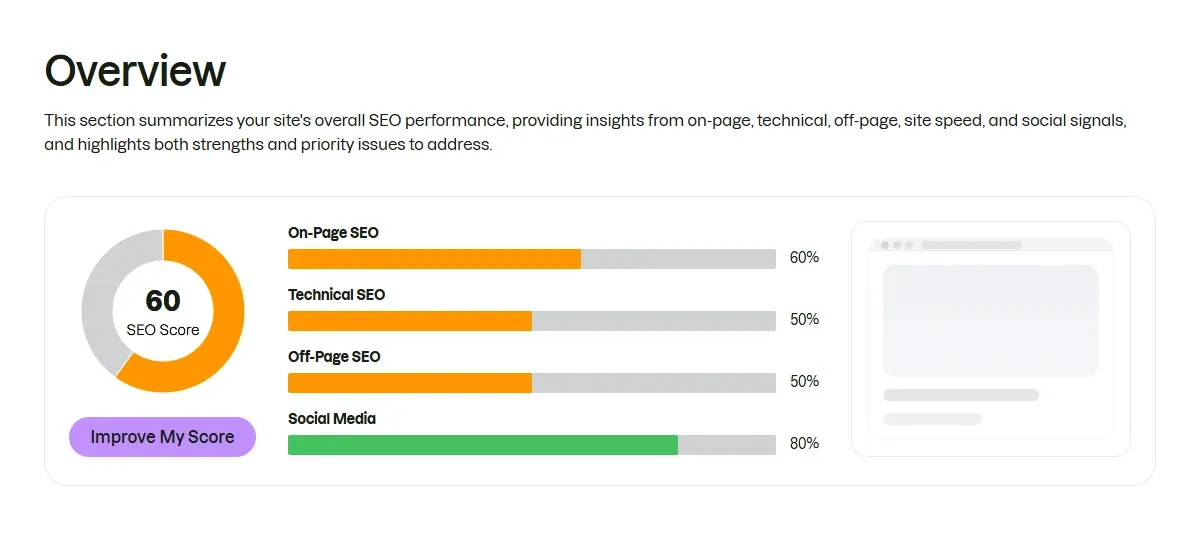
Using a page builder does not automatically hurt SEO. The bigger issue is how the builder affects the technical structure and performance of your website.
For example, a website with excellent content can still provide a poor experience if its pages are extremely slow, difficult to navigate, or poorly optimized for mobile devices.
When evaluating a best WordPress page builder, consider how it handles:
- Page structure
- Loading performance
- Responsive layouts
- Image optimization
- Heading hierarchy
- Accessibility
- Internal linking
- Metadata compatibility
It is also important to remember that SEO is broader than the page builder itself. Hosting, caching, content, site architecture, and technical configuration all contribute to search performance.
Do Page Builders Make WordPress Websites Slow?
They can, but the answer is not simply yes or no. A page builder adds another layer between the visual editor and the final webpage. Depending on how it generates markup and assets, that layer can influence performance.
However, poor optimization can also make a website slow even when using a lightweight editor. Large images, excessive plugins, third-party tracking scripts, poorly configured hosting, and unnecessary animations can all contribute to slow loading. For that reason, website performance should be evaluated as a complete system rather than blaming the page builder alone.
Free vs Premium WordPress Page Builders
There are many free WordPress page builders, while others use premium subscriptions or paid extensions. A free builder may be enough for:
- Personal blogs
- Simple business websites
- Basic portfolios
- Small landing pages
Premium tools can become more useful when you need:
- Advanced design controls
- Dynamic content
- Marketing features
- Premium templates
- Advanced responsive controls
- Team collaboration
- Professional support
The most expensive builder is not necessarily the best choice. Your decision should be based on the features you actually need.
WordPress Page Builder vs Gutenberg
For many websites, the standard WordPress block editor may be enough. Gutenberg works well for content-focused websites and integrates directly with WordPress. A dedicated visual builder becomes more attractive when you need greater control over page layouts, design systems, advanced components, animations, or visual editing workflows.
Therefore, the question should not always be:
“Which is the best WordPress page builder?”
Sometimes the better question is:
“Do I need a page builder at all?”
For a simple blog, Gutenberg may be sufficient. For a highly customized marketing website, a visual builder may save significant time.
Where Does Kirki Fit In?
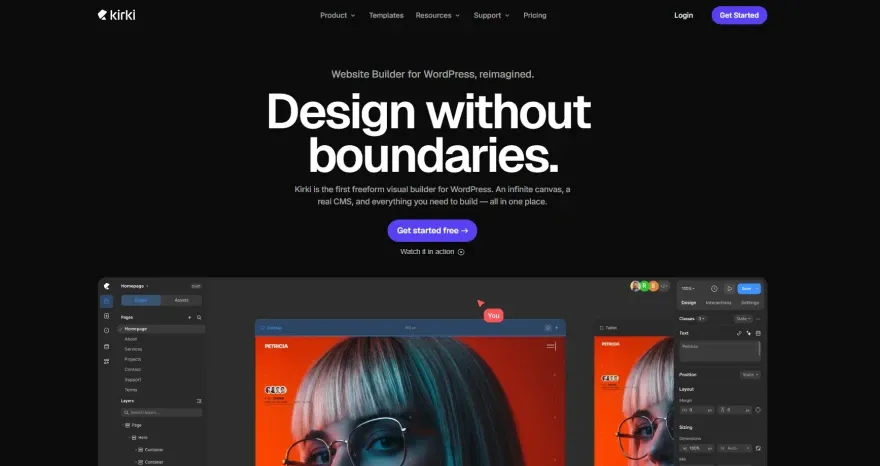
Kirki Website Builder is an example of the newer direction in WordPress site creation. Instead of focusing only on traditional sections and columns, Kirki uses a freeform canvas-based workflow. This can be useful for users who prefer a more visual and flexible approach to page design.
Its feature set also goes beyond basic page editing, with capabilities around dynamic content, responsive design, animations, forms, popups, and other website-building tasks.
However, that does not mean Kirki is automatically the best wordpress page builder for every project. Someone building a simple blog may prefer the native WordPress editor. Another user may prefer a traditional drag-and-drop builder because its workflow feels more familiar.
Kirki is better viewed as an option for users who want a more flexible visual workflow and are interested in combining design and broader website-building capabilities in one environment.
How to Choose the Best WordPress Page Builder for Your Website
Instead of choosing a builder based only on popularity, evaluate it according to your actual requirements.
For Beginners
Prioritize:
- Easy visual editing
- Ready-made templates
- Simple responsive controls
- Good documentation
- Reliable support
For Bloggers
Focus on:
- Lightweight output
- Compatibility with WordPress
- Fast loading
- Clean content layouts
- SEO compatibility
For Freelancers
Look for:
- Reusable templates
- Global styles
- Custom layouts
- Responsive controls
- Efficient workflow
For Agencies
Consider:
- Collaboration
- Design systems
- Reusable components
- Client management
- Performance
- Scalability
For Developers
Look for:
- Clean markup
- Class-based styling
- Customization options
- Dynamic data
- Extensibility
- Code control
Common Mistakes When Choosing a Page Builder
Choosing a page builder based only on its number of widgets is a common mistake.
More features do not necessarily mean a better website.
Other mistakes include:
- Ignoring mobile performance
- Choosing a builder without checking compatibility
- Installing too many add-ons
- Prioritizing animations over usability
- Not considering future maintenance
- Choosing based only on templates
- Ignoring accessibility
- Assuming the builder alone will improve SEO
A better approach is to identify what your website actually needs and then compare tools against those requirements.
WordPress Page Builder Checklist
Before choosing a builder, ask yourself:
- Is it easy enough for my skill level?
- Does it provide the design freedom I need?
- Can I control mobile and tablet layouts?
- Will it work with my existing plugins?
- Does it generate reasonably clean output?
- Can I create reusable styles and components?
- Does it support the type of content my website needs?
- Will it allow me to maintain the website easily?
- Does it fit my budget?
- Can I test it before committing?
If a builder performs well across these areas, it is much more likely to be a good long-term choice.
Frequently Asked Questions
What is the best WordPress page builder?
There is no universal answer. The best WordPress page builder depends on your website type, design requirements, technical experience, performance goals, and budget. Beginners may prefer simplicity, while designers and agencies may need more advanced visual controls.
Is a WordPress page builder good for beginners?
Yes. Page builders can make website creation significantly easier for beginners because they provide visual editing instead of requiring users to write code for every design change.
Does using a page builder hurt SEO?
Not necessarily. SEO performance depends on many factors. A well-optimized website can rank successfully with a page builder, provided the builder does not create unnecessary technical or performance problems.
Are WordPress page builders better than Gutenberg?
It depends on the website. Gutenberg is often sufficient for blogs and content-focused sites. A dedicated builder may be more appropriate when you need advanced visual design, layouts, interactions, or additional website-building functionality.
Should I choose a free or premium page builder?
Choose based on your requirements. Free tools can be enough for simple websites, while premium builders may be worthwhile for advanced design, dynamic content, templates, collaboration, or professional support.
Is Kirki a good option for WordPress websites?
Kirki can be worth considering if you want a more flexible visual workflow and features that go beyond traditional page editing. Its freeform canvas and broader website-building capabilities make it an interesting option, particularly for users who want greater visual control. However, the right choice ultimately depends on your project’s requirements.
Final Thoughts
Choosing the best wordpress page builder is less about finding the tool with the longest feature list and more about finding the right balance between design freedom, performance, usability, SEO, responsiveness, compatibility, and long-term maintenance.
Traditional drag-and-drop builders remain useful for many websites, while Gutenberg provides a lightweight option for users who prefer the native WordPress experience. Newer visual approaches are also giving designers more freedom and combining page design with broader website-building capabilities.
Kirki is one example of this newer approach, particularly for users interested in a freeform visual workflow and integrated website-building features. But it should be evaluated alongside your specific needs rather than treated as the automatic winner.
Ultimately, the best WordPress page builder is the one that helps you build the website you need without creating unnecessary complexity for the future.